The apps you need for China
Apps for China do most of the work on a trip, until one stops. Install the right ones at home, and carry the Mandarin for that moment.
Apps for China to install before you fly
Work down this list in order, on your own wi-fi. Open a row for the exact App Store name, the publisher and a test to run. Ticks save on this device only.
Sort your connection
eSIM or roamingAsk the provider how it handles Chinese apps and blocked services. Plans differ. Check your home number can still receive texts too, because Trip.com’s DiDi guide says sign-up needs a code sent to your phone.
An eSIM or roaming planBought before you leaveSet up both payment apps
Alipay, WeChatLink your card and finish verification, using our payments guide. Travel guides report WeChat sometimes asking an existing user to verify a new account, which is one more reason to start at home.
Install your ride app
DiDi ChinaLog in with your own mobile number and add an international card.
DiDi China: Ride HailingDidi Chuxing (Beijing) Network Platform Technology Co., LtdSee screens in the App StoreInstall two maps
AMap Global, Baidu MapsSearch for your first hotel in both, so you know each one works. Baidu Maps wasn’t in the UK App Store when we checked, so look for it early.
百度地图Bǎidù Dìtú, Baidu MapsBeijing Baidu Netcom Science & Technology Co.,LtdSee screens in the App StoreInstall your train apps
Railway 12306, Trip.comSet up your account and passport details well before you fly. You can’t buy tickets until your identity is verified, and Beijing’s foreign affairs office says the check usually takes three to five working days. Look for your status under Me in the app.
Install the food apps
Meituan, DianpingFinish your payment set-up first, then browse a menu to see how much you can follow. Neither app was in the UK App Store when we checked, so look for them early.
Dianping: Discover Good PlacesHanhai Information Technology (Shanghai) Co.LtdSee screens in the App StorePrepare a translator
Any offline translatorDownload the offline Chinese pack, switch to flight mode, and translate a sentence. For single words, keep our Chinese dictionary handy.
Any app with offline ChineseYour choice, downloaded at homeSave your addresses
Screenshots of each addressCopy each address in characters from your booking, or ask the hotel. Screenshot it, then open the screenshots in flight mode.
Your hotels, in charactersAs screenshots in your photos
Two apps called DiDi
Written for visitors to China, with an English interface and international bank cards.
See screens in the App StoreIts Australian listing covers Australia and New Zealand and never mentions China. Some guides recommend it, so go by the listing.
Two apps with 12306 in the name
Listed in the App Store under its Chinese name, Tiělù 12306.
See screens in the App StoreA different publisher, with 官网 (guānwǎng, official website) in its name.
Why your connection comes first
Almost every other app on this page depends on it. GOV.UK’s China travel advice lists Google, Facebook, YouTube and X as permanently blocked, and says other websites may sometimes be blocked. If your trip leans on Google Maps or Gmail, plan around them now.
On VPNs, GOV.UK says China’s cybersecurity laws state that online products and services, such as VPNs, need to be licensed.
Which app, at which moment
Nine stops, in the order a trip hands them to you. Open a stop to see where its apps stop helping, and the card to show when they do. Apps change, so treat Will’s notes as one traveller’s experience.
| 1Land | 2Ride | 3Hotel | 4Route | 5Train | 6Eat | 7Pay | 8Battery | 9Home | |
|---|---|---|---|---|---|---|---|---|---|
| eSIM | eSIM at stop 1 | ||||||||
| AMap Global | AMap Global at stop 1 | AMap Global at stop 2 | AMap Global at stop 3 | AMap Global at stop 4 | AMap Global at stop 9 | ||||
| DiDi China | DiDi China at stop 2 | DiDi China at stop 9 | |||||||
| Alipay | Alipay at stop 2 | Alipay at stop 7 | |||||||
| WeChat at stop 7 | |||||||||
| Baidu Maps | Baidu Maps at stop 4 | ||||||||
| Railway 12306 | Railway 12306 at stop 5 | ||||||||
| Trip.com | Trip.com at stop 3 | Trip.com at stop 5 | |||||||
| Meituan | Meituan at stop 6 | ||||||||
| Dianping | Dianping at stop 6 | ||||||||
| Cash, paper | Cash, paper at stop 8 |
1
Landing
- Your eSIM
- AMap Global
到达dàodáArrivalsTurn on your eSIM or roaming as soon as you land. AMap Global’s listing includes arrival guides, customs exit tips and internet access help, so it is the first app worth opening. You can also fill in your arrival card online before you land. China’s embassy notice lists the immigration agency’s site and app and WeChat or Alipay mini programs, and if you don’t, you can do it at the checkpoint by QR code, machine or paper card.
Where it stopsWithout a signal, most of these apps can’t help you. Your screenshots still open, so show someone the address and ask.
2
Your first ride
- DiDi China
- Alipay
- AMap Global
打车dǎchēTaxisDiDi China’s listing promises an English interface and in-app chat that translates between you and your driver. On our test phone it opened in English and showed named pick-up points at Beijing Daxing Airport. Amap’s own launch notice describes English ride-hailing across several platforms, with pick-up locations and fare estimates, so check the pick-up point on the map before you book, above all at big stations and airports. Will has used DiDi directly and through Alipay. Travellers also report confirming the ride with the last four digits of their phone number.
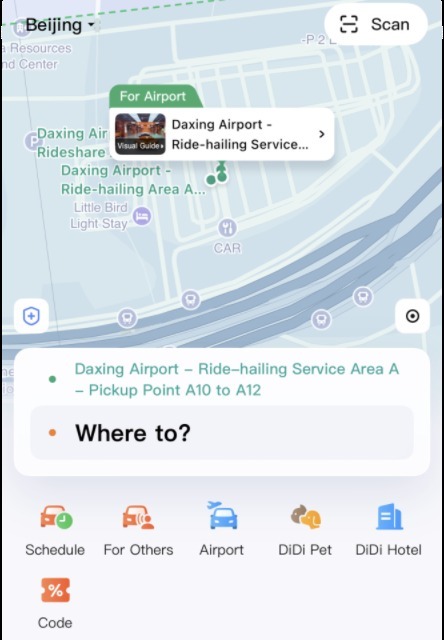
DiDi China showing a named pick-up point at Beijing Daxing Airport. Where it stopsTranslated chat is no help if the driver phones you. Send them card 4 in the chat. If the app won’t book at all, search for DiDi inside Alipay and try there. After that, ask a front desk or shop to call you a car.
3
Checking in
- Trip.com
- AMap Global
酒店jiǔdiànHotelGOV.UK says hotels register you when you check in, so have your passport in your hand and your booking on screen. AMap Global’s listing covers hotel routes for getting there.
Where it stopsAn app can show a booking, but it can’t check you in. Hand over your passport and show this card.
4
Finding the way
- AMap Global
- Baidu Maps
找路zhǎolùFinding the wayAmap says foreign visitors get the same driving, walking, cycling and public transport navigation as locals. On our test phone it first opened in Chinese, then came up in English after we closed and reopened it, so try it before you fly. Baidu Maps is the one Will relied on, and it worked for him. Its App Store name is in Chinese.
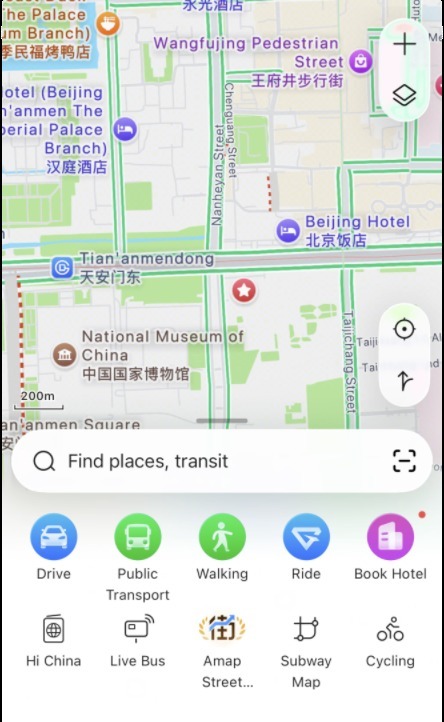
Amap in English, with place names in both languages. 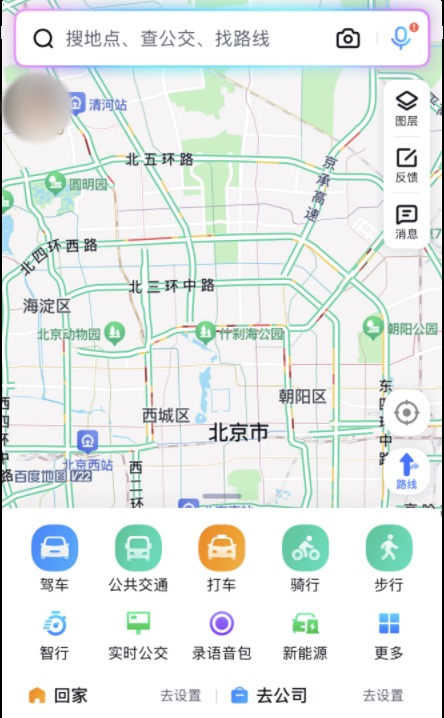
Baidu Maps, listed in the App Store as 百度地图 (Bǎidù Dìtú). Its home screen is in Chinese. Where it stopsA map can’t ask a stranger for you. Show the destination on your screen, then show this card.
5
Booking a train
- Railway 12306
- Trip.com
坐高铁zuò gāotiěHigh-speed railThe 12306 English site has menus for booking, refunds and changes. The Railway 12306 app opened in English on our test phone and showed timetables and fares without logging in. Trip.com is the other route. Will has used both, and his Visa and Mastercard went through.
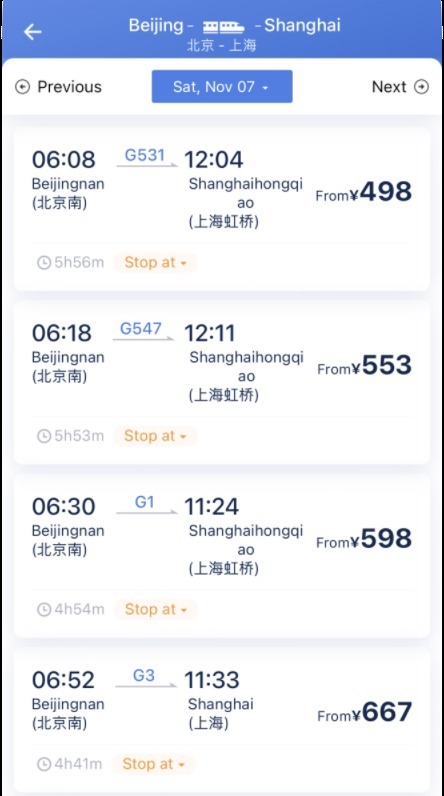
Railway 12306 listing Beijing to Shanghai trains. Fares and times change. Where it stopsTravel guides also report foreign cards being declined, so keep Alipay or WeChat Pay ready. If the app won’t cooperate or your passport won’t verify, go to the ticket window with your passport.
6
Ordering food
- Meituan
- Dianping
吃饭chīfànEatingWill has ordered through both, though he also reads Chinese, so don’t take that as a promise of English. On our test phone Dianping showed English categories and a See Translation button, but much of the page stayed in Chinese. Meituan opened in Chinese too. Its settings offer English for hotel, travel and restaurant pages, but its home screen stayed in Chinese when we tried. Expect payment to run through the wallet you set up at home.
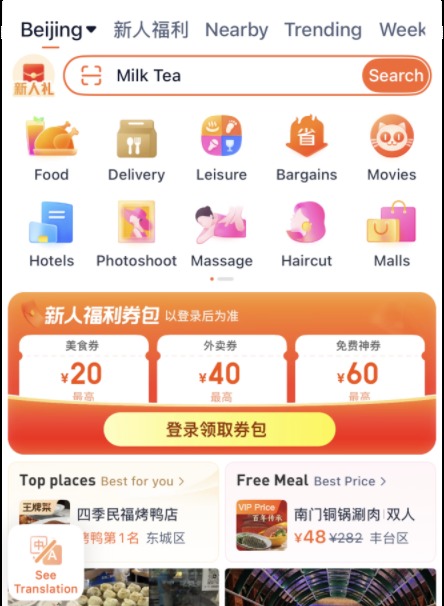
Dianping set to Beijing: English categories, Chinese offers. 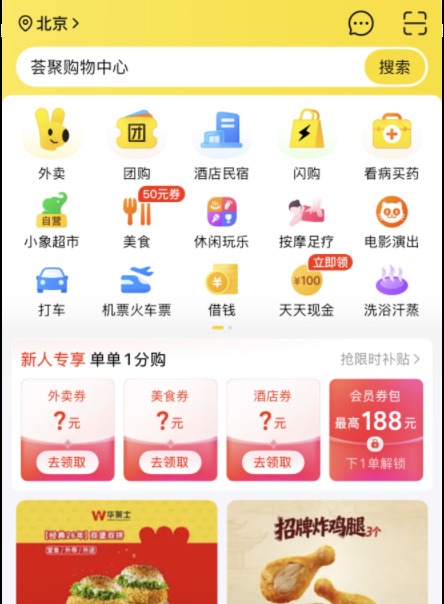
Meituan set to Beijing, in Chinese on our test phone. Where it stopsIf the screen beats you, walk in and point. Our ordering food guide covers the rest of the meal.
7
Paying
- Alipay
付款fùkuǎnPayingKeep both apps ready, because they are not interchangeable and you can’t predict which one a stall takes. The payments guide covers the set-up.
Where it stopsThere are two kinds of QR code, and they work in opposite directions. When the scan fails, ask which way it goes. If the payment itself fails, ask to pay another way.
8
When the phone dies
- Cash
- Paper
没电méi diànOut of batteryEvery app on this page stops here. Carry a little cash, and keep your hotel’s address on paper as well as in your photos.
Where it stopsAsk to charge while you still have battery to show this card. After that, read the pinyin aloud as best you can.
9
Leaving for the airport
- DiDi China
- AMap Global
回家huíjiāGoing homeThe same apps take you back. Book your ride with time to spare, and open your saved address for the last night in case you need to give it to a driver.
Where it stopsIf nothing will book, ask your hotel’s front desk and show them this card.
13 rescue cards
For the moment an app gives up. Tap a card to fill your screen and hold up your phone, or read the pinyin aloud.